I open-sourced Absorbed, the first game I have built, as a clean Apache 2.0 repository. It is an ongoing landscape iPhone and iPad roguelike inspired by Darkest Dungeon, Slay the Spire, and creature-collecting games, reinterpreted through Buddhist ideas about attachment, identity, and letting go.
The most reusable lesson did not come from combat design. It came from learning that generating a good image is only the first step. A game also needs stable names, predictable crops, consistent dimensions, safe margins, and a way to add new art without breaking old art.
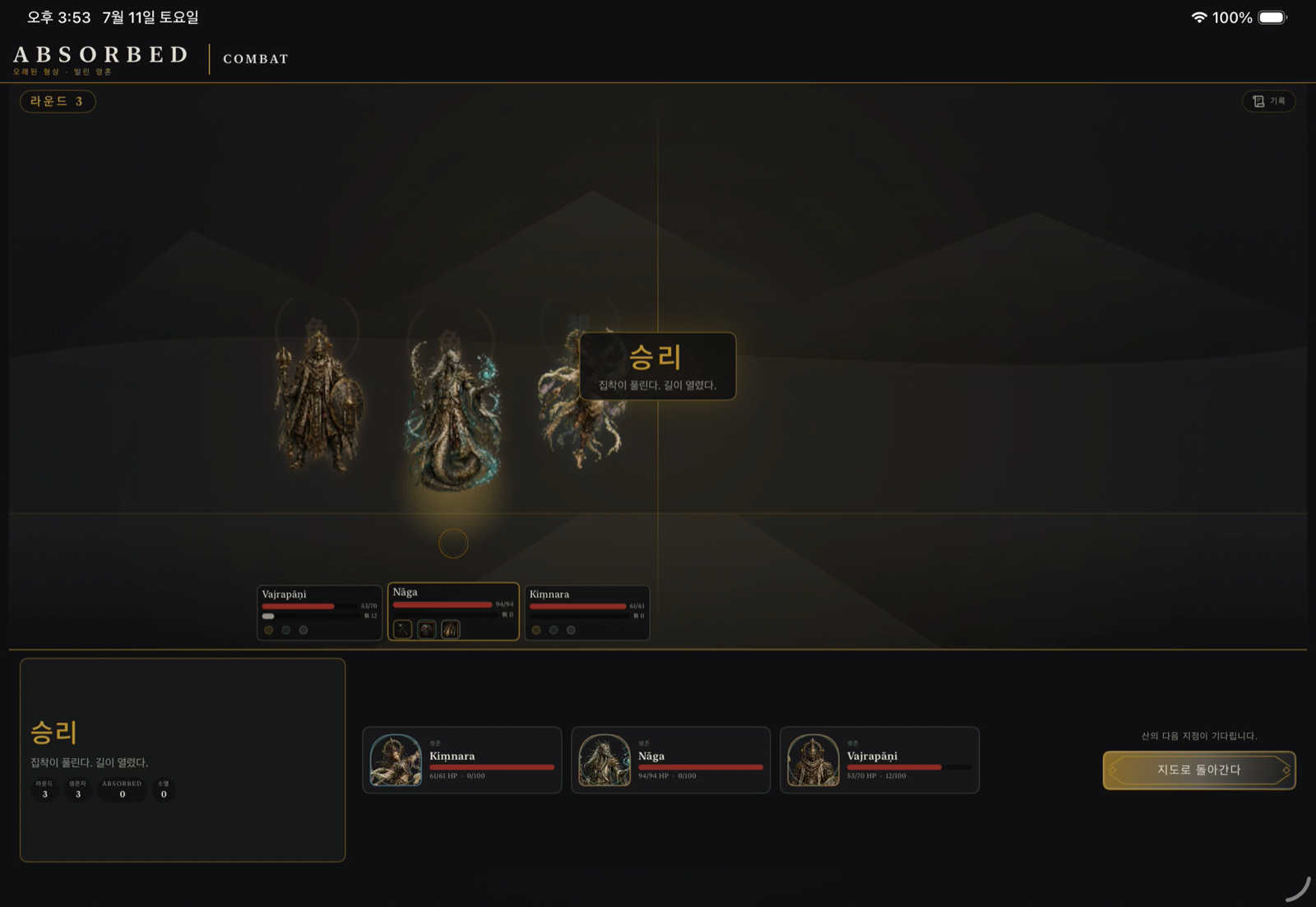 Absorbed is a playable English and Korean SwiftUI prototype. This captured combat result shows the dark, restrained visual language that the asset pipeline must preserve.
Image generation is not an asset pipeline
I first treated each icon as an individual generation task. That sounded sensible: one prompt, one image, and maximum control. It also created repeated work. Every new skill needed another prompt, another review, another filename, and another opportunity for the visual language to drift.
In simple words - Asset pipeline: An asset pipeline is the repeatable path that turns source art into files the game can load. It is the difference between owning a box of illustrations and having labeled pieces that always fit the board.
The opposite extreme was not better. A single growing strip with five, six, or more icons made each icon occupy less of the generated canvas. It also made cell boundaries harder to detect reliably. A huge atlas looked efficient from a distance, but it reduced the usable detail inside each icon.
The useful middle ground was a small, fixed batch:
- use a 2×2 source sheet for three or four related images;
- use separate sources for one or two images unless a native wide canvas is available;
- keep accepted batches immutable;
- add later skills as a new batch instead of regenerating an old sheet.
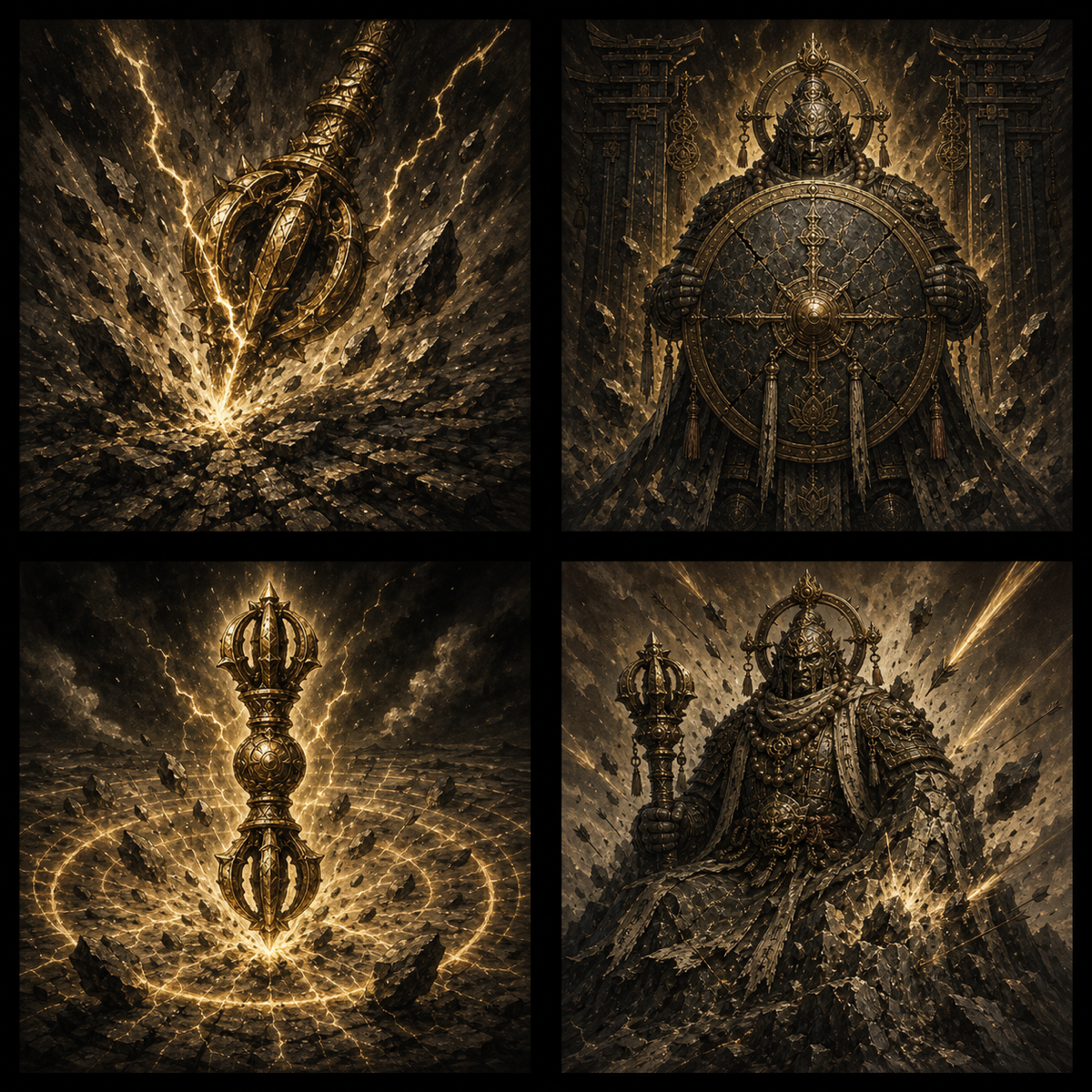 One immutable source batch contains four related Vajrapani skills. The shared generation gives the set a common material, palette, and visual weight.
In simple words - Immutable batch: Once a batch is accepted, I do not regenerate it merely to append another item. It behaves like a printed page: new material goes on a new page, so the approved cells never move.
This rule protects more than aesthetics. Regenerating a sheet can subtly replace every accepted image, even when I only wanted one new skill. An immutable batch makes change local and reviewable.
The manifest gives every cell an identity
A grid is still ambiguous unless the code knows what each cell means. I store that identity in a manifest, a small JSON file that maps each row-major slot to a stable game ID.
In simple words - Manifest: A manifest is a packing list. It says which picture is in each cell, so a script does not have to guess from the image itself.
The real skill manifest contains entries like this:
{
  "sheet": "imagegen_vajrapani_skills.png",
  "columns": 2,
  "rows": 2,
  "slots": [
    "vajra_strike",
    "gate_stance",
    "adamant_quake",
    "immovable_mountain"
  ]
}
The committed manifest defines 15 skill batches with 60 filled slots. The gear manifest adds 31 batches for 100 weapons and 24 armor pieces. Three facility batches produce 11 building images. Together, these 49 fixed batches describe 195 outputs.
Those numbers are not a benchmark for every project. They describe the current repository on July 25, 2026. The important property is that every output has an explicit source, cell, and destination.
Source layout and runtime layout solve different problems
The source grid is convenient for generation and review. The game should not load that grid and guess a crop at runtime. A preparation script splits each batch into independent 512×512 PNG files before the app is built.
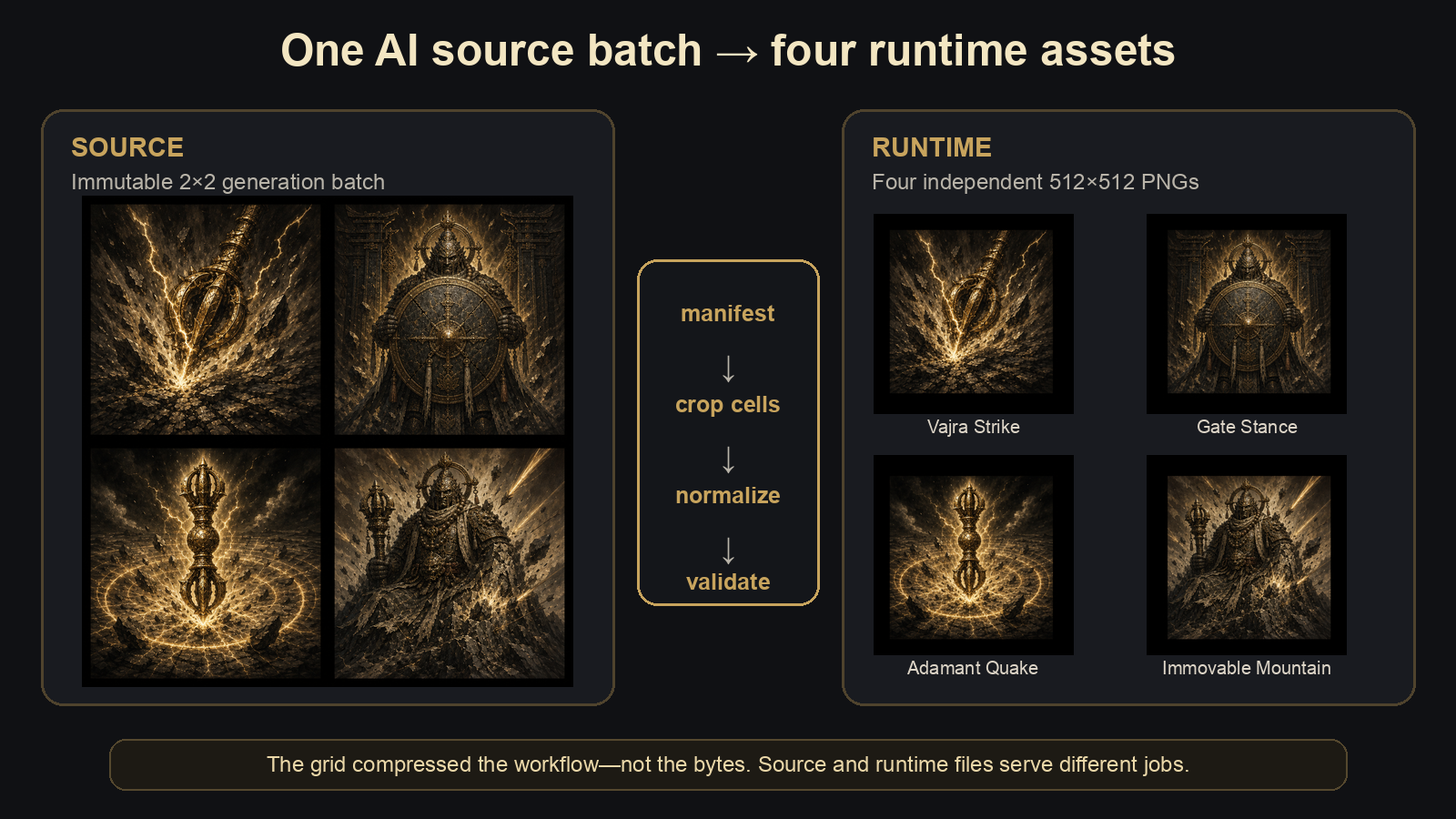 The source sheet optimizes generation and review. The runtime files optimize stable lookup, layout, and validation.
In simple words - Runtime asset: A runtime asset is the final file the app loads while it is running. The source sheet is a workshop material; the runtime icon is the finished part installed in the product.
The preparation script performs four jobs:
- read the manifest and preserve its row-major order;
- crop the declared cell from the source sheet;
- fit the visible art into a 512×512 transparent tile;
- validate dimensions, safe margins, duplicates, and missing files.
The output reserves an 8% margin on each side around the occupied art. This keeps important detail away from UI masks and card borders.
In simple words - Safe area: A safe area is empty breathing room around the important pixels. It is like keeping text away from the edge of a printed page so another frame does not cut it off.
At runtime, skill collections use a stable 1×N horizontal row. Four icons fit without shrinking; a fifth continues in the same scrolling row. That layout is deliberately unrelated to the 2×2 generation grid. One shape helps the model produce art, while another helps the player read the interface.
The grid did not compress the bytes
I initially described batching as a storage improvement. Measuring the files corrected that statement.
| Representative Vajrapani files | Files | Bytes | Purpose |
|---|---|---|---|
| One 2×2 source sheet | 1 | 2,975,117 | Generation source and visual review |
| Four normalized runtime icons | 4 | 1,675,150 | Stable files loaded by the game |
| Source and outputs retained together | 5 | 4,650,267 | Reproducibility plus runtime use |
The source sheet alone is larger than the four optimized runtime icons in this example. Keeping both layers uses more disk space, not less.
The grid compressed the workflow:
- fewer generation units to prompt and review;
- stronger visual consistency inside one family;
- one manifest entry can describe four related outputs;
- accepted art remains stable when the catalog grows;
- one validator can enforce the same contract across every batch.
It did not automatically compress the repository. That distinction matters because an efficient process and a small archive are separate engineering goals.
Publishing the code required a second pipeline
Opening the repository was not just a visibility switch. The working files contained an Apple development-team identifier, a personal bundle identifier, and Git author metadata from the private history. I removed those values, changed the public bundle ID to org.example.absorbed, expanded the ignore rules for environment and signing files, and rewrote the README for a new reader.
The old repository also contained seven pull requests. A normal force-push would not guarantee that their referenced commits disappeared. GitHub’s own sensitive-data removal guide explains that old commits can remain reachable through pull requests, cached views, forks, and existing clones.
I therefore kept the original repository as a private archive and created a fresh public repository from one neutral root commit. The public result has:
- one
mainbranch; - one commit by
Absorbed Contributors; - no inherited pull requests;
- no Apple signing team or personal bundle identifier;
- an Apache 2.0 license and a contributor-oriented README.
This approach preserved the development record privately without publishing the private identity embedded in that record.
In simple words - Clean root commit: A root commit is the first snapshot in Git history. Creating a clean one is like publishing a finished book without attaching every private draft and margin note used to write it.
What failed, and what each failure taught me
Four wrong assumptions improved the final system.
One image per generation must give the most control. It did give local control, but it multiplied prompting and review. Small batches offered enough control while making related icons easier to compare.
A wider sheet must be more efficient. Beyond four slots, each icon lost usable resolution and crop reliability. The source format needed a strict maximum.
Fewer source files must mean fewer bytes. The measured example disproved that. Batching improved coordination, while retaining source and runtime layers increased storage.
Rewriting main must clean a repository. Existing pull-request references made that incomplete. A new public root was easier to explain and verify.
How I checked the result
I ran the repository’s full bash tools/check.sh gate before publication. It passed all nine content, shop, asset, localization, parity, and deterministic balance checks.
I also built the SwiftUI target with Xcode for the iOS Simulator on the local Mac. The build passed with code signing disabled and the new generic bundle identifier. A final scan found no tracked personal paths, development-team ID, personal email, private-key signature, or live credential pattern.
After publication, I checked GitHub’s API without authentication. It reported one public branch, one commit, zero pull requests, and Apache 2.0 as the detected license. These checks do not prove that the game is finished. They prove that the published snapshot matches the release contract I intended.
Learn the system, then leave room to forget it
AI tools make procedural judgment more valuable. The model can generate many images, but someone still has to decide the batch size, naming rule, review boundary, failure condition, and runtime contract.
There is also a tension. Learning established patterns makes work faster, but a pattern can become a fence around imagination. Sometimes not knowing the “correct” method creates enough freedom to invent a different one.
I do not think the answer is permanent ignorance. A better loop is:
explore without a rule
        ↓
notice repeated pain
        ↓
design a small system
        ↓
measure where it helps
        ↓
break or replace it when the idea changes
The 2×2 grid is not a universal law. It is the smallest rule that solved this project’s current problem. The deeper skill is knowing why the rule exists, so I can also recognize the moment when it should stop applying.
Limits and next steps
This method works well for families of icons with a shared visual language. A large character portrait or narrative scene may still deserve an individual generation. The four-slot limit also reflects this project’s canvas sizes and crop behavior; another model or art direction may support a different limit.
The repository currently retains both generation sources and normalized runtime files for reproducibility. A later storage pass could move heavyweight sources to versioned releases or another artifact store while keeping manifests and runtime assets in Git. That is planned, not implemented.
Absorbed itself remains a playable prototype rather than an App Store release. The public repository includes the game, bilingual content, preparation scripts, manifests, tests, and the decisions behind them.
Key terms
- Asset pipeline: the repeatable process that converts source art into validated files a game can load.
- Immutable batch: a fixed generation sheet that is not regenerated when later items are added.
- Manifest: structured metadata that maps each grid cell to a stable ID.
- Runtime asset: the final independent file loaded by the application.
- Safe area: reserved space around important visual content that protects it from masks, borders, and cropping.
제가 처음 만든 게임인 Absorbed(흡수)를 깔끔한 Apache 2.0 저장소로 오픈소스 공개했습니다. 현재도 개발 중인 가로 모드 iPhone·iPad 로그라이크로, Darkest Dungeon, Slay the Spire, 그리고 크리처 수집 게임에서 영감을 받아 집착, 정체성, 내려놓음에 관한 불교적 사유로 다시 해석한 작품입니다.
가장 재사용 가치가 높았던 교훈은 전투 설계에서 나오지 않았습니다. 좋은 이미지를 생성하는 것은 첫 단계에 불과하다는 사실을 배운 데서 나왔습니다. 게임에는 안정적인 이름, 예측 가능한 크롭, 일관된 크기, 안전 여백, 그리고 기존 아트를 깨뜨리지 않고 새 아트를 추가하는 방법이 함께 필요합니다.
Absorbed는 영어와 한국어로 플레이할 수 있는 SwiftUI 프로토타입입니다. 캡처한 전투 결과 화면은 asset pipeline이 지켜야 하는 어둡고 절제된 시각 언어를 보여 줍니다.
이미지 생성은 asset pipeline이 아니다
처음에는 아이콘 하나하나를 개별 생성 작업으로 다뤘습니다. 합리적으로 들렸습니다. 프롬프트 하나에 이미지 하나, 그리고 최대한의 통제력. 하지만 반복 작업도 함께 생겼습니다. 새 스킬이 생길 때마다 프롬프트를 또 쓰고, 또 검수하고, 파일 이름을 또 정해야 했고, 그만큼 시각 언어가 어긋날 기회도 늘어났습니다.
쉽게 말하면 - Asset pipeline(에셋 파이프라인): asset pipeline은 원본 아트를 게임이 불러올 수 있는 파일로 바꾸는 반복 가능한 경로입니다. 일러스트가 담긴 상자를 갖고 있는 것과, 언제나 보드에 딱 맞는 라벨 붙은 조각을 갖고 있는 것의 차이입니다.
반대 극단도 나을 게 없었습니다. 아이콘이 다섯, 여섯 개 이상으로 계속 늘어나는 하나의 긴 스트립에서는 각 아이콘이 생성 캔버스에서 차지하는 비중이 줄어듭니다. 칸 경계를 안정적으로 찾아내기도 더 어려워집니다. 거대한 atlas는 멀리서 보면 효율적으로 보이지만, 실제로는 각 아이콘 안에서 쓸 수 있는 디테일을 줄였습니다.
쓸모 있는 중간 지점은 작고 고정된 batch였습니다.
- 관련 이미지 세 개나 네 개는 2×2 원본 시트를 사용합니다.
- 네이티브 와이드 캔버스를 쓸 수 없다면 이미지 한두 개는 별도 원본으로 생성합니다.
- 승인된 batch는 변경하지 않습니다.
- 나중에 생긴 스킬은 기존 시트를 다시 생성하지 않고 새 batch로 추가합니다.
변경 불가능한 원본 batch 하나에 서로 관련된 Vajrapani 스킬 네 개가 들어 있습니다. 한 번에 함께 생성했기 때문에 세트 전체가 공통된 질감, 팔레트, 시각적 무게감을 갖습니다.
쉽게 말하면 - Immutable batch(변경 불가능한 batch): 한 번 승인된 batch는 항목 하나를 덧붙이려는 이유만으로 다시 생성하지 않습니다. 인쇄된 페이지처럼 동작합니다. 새 내용은 새 페이지에 싣기 때문에 승인된 칸은 절대 움직이지 않습니다.
이 규칙은 미감 이상의 것을 지켜 줍니다. 새 스킬 하나만 원했더라도 시트를 다시 생성하면 이미 승인된 모든 이미지가 미묘하게 바뀔 수 있습니다. immutable batch는 변경을 국소적이고 검토 가능한 상태로 유지해 줍니다.
Manifest는 모든 칸에 정체성을 부여한다
코드가 각 칸의 의미를 알지 못하면 grid는 여전히 모호합니다. 저는 그 정체성을 manifest에 저장합니다. row-major 순서의 각 슬롯을 안정적인 게임 ID에 매핑하는 작은 JSON 파일입니다.
쉽게 말하면 - Manifest(매니페스트): manifest는 포장 명세서입니다. 각 칸에 어떤 그림이 들어 있는지 알려 주므로, 스크립트가 이미지 자체를 보고 추측할 필요가 없습니다.
실제 스킬 manifest에는 다음과 같은 항목이 들어 있습니다.
{
  "sheet": "imagegen_vajrapani_skills.png",
  "columns": 2,
  "rows": 2,
  "slots": [
    "vajra_strike",
    "gate_stance",
    "adamant_quake",
    "immovable_mountain"
  ]
}
커밋된 manifest는 15개의 스킬 batch와 채워진 슬롯 60개를 정의합니다. 장비 manifest는 무기 100개와 방어구 24개를 위한 batch 31개를 더합니다. 시설 batch 3개는 건물 이미지 11개를 만듭니다. 이 고정 batch 49개가 모두 합쳐 195개의 결과물을 기술합니다.
이 숫자가 모든 프로젝트에 통하는 벤치마크는 아닙니다. 2026년 7월 25일 기준 현재 저장소를 설명할 뿐입니다. 중요한 성질은 모든 결과물이 명시적인 원본, 칸, 목적지를 갖는다는 점입니다.
원본 레이아웃과 runtime 레이아웃은 서로 다른 문제를 푼다
원본 grid는 생성과 검수에 편리합니다. 하지만 게임이 그 grid를 불러와서 runtime에 크롭 위치를 추측해서는 안 됩니다. 앱을 빌드하기 전에 준비 스크립트가 각 batch를 독립된 512×512 PNG 파일로 분리합니다.
원본 시트는 생성과 검수에 최적화되어 있습니다. runtime 파일은 안정적인 조회, 레이아웃, 검증에 최적화되어 있습니다.
쉽게 말하면 - Runtime asset(런타임 에셋): runtime asset은 앱이 실행되는 동안 불러오는 최종 파일입니다. 원본 시트가 작업장의 재료라면, runtime 아이콘은 제품에 장착되는 완성 부품입니다.
준비 스크립트는 네 가지 일을 합니다.
- manifest를 읽고 row-major 순서를 그대로 유지합니다.
- 원본 시트에서 선언된 칸을 크롭합니다.
- 보이는 아트를 512×512 투명 타일 안에 맞춰 넣습니다.
- 크기, 안전 여백, 중복, 누락 파일을 검증합니다.
결과물은 아트가 차지하는 영역 주위로 각 변에 8%의 여백을 확보합니다. 이렇게 하면 중요한 디테일이 UI 마스크나 카드 테두리에 닿지 않습니다.
쉽게 말하면 - Safe area(안전 영역): safe area는 중요한 픽셀 주위에 남겨 두는 빈 여유 공간입니다. 인쇄물에서 글자를 페이지 가장자리에서 떨어뜨려 두어 다른 프레임에 잘리지 않게 하는 것과 같습니다.
runtime에서 스킬 모음은 안정적인 1×N 가로 행을 사용합니다. 아이콘 네 개는 줄어들지 않고 들어가며, 다섯 번째 아이콘은 같은 스크롤 행에 이어집니다. 이 레이아웃은 의도적으로 2×2 생성 grid와 무관하게 설계했습니다. 한 형태는 모델이 아트를 만드는 데 도움을 주고, 다른 형태는 플레이어가 인터페이스를 읽는 데 도움을 줍니다.
Grid는 바이트를 압축하지 않았다
처음에는 batch 방식을 저장 공간 개선이라고 설명했습니다. 파일을 직접 측정해 보고 그 말을 바로잡았습니다.
| 대표 Vajrapani 파일 | 파일 수 | 바이트 | 용도 |
|---|---|---|---|
| 2×2 원본 시트 1장 | 1 | 2,975,117 | 생성 원본 및 시각 검수 |
| 정규화된 runtime 아이콘 4개 | 4 | 1,675,150 | 게임이 불러오는 안정적인 파일 |
| 원본과 결과물을 함께 보관 | 5 | 4,650,267 | 재현성과 runtime 사용 |
이 예시에서는 원본 시트 하나만으로도 최적화된 runtime 아이콘 네 개보다 큽니다. 두 계층을 모두 보관하면 디스크 공간은 줄어드는 것이 아니라 늘어납니다.
grid가 압축한 것은 작업 과정이었습니다.
- 프롬프트를 쓰고 검수할 생성 단위가 줄어듭니다.
- 한 계열 안에서 시각적 일관성이 강해집니다.
- manifest 항목 하나로 관련 결과물 네 개를 기술할 수 있습니다.
- 카탈로그가 커져도 승인된 아트는 안정적으로 유지됩니다.
- 검증기 하나로 모든 batch에 같은 계약을 강제할 수 있습니다.
저장소가 자동으로 압축된 것은 아니었습니다. 효율적인 프로세스와 작은 아카이브는 서로 다른 엔지니어링 목표이기 때문에 이 구분이 중요합니다.
코드를 공개하려면 두 번째 파이프라인이 필요했다
저장소 공개는 단순히 공개 여부 스위치를 바꾸는 일이 아니었습니다. 작업 파일에는 Apple 개발 팀 식별자, 개인 bundle identifier, 그리고 비공개 히스토리의 Git 작성자 메타데이터가 들어 있었습니다. 저는 이 값들을 제거하고, 공개용 bundle ID를 org.example.absorbed로 바꾸고, 환경 파일과 서명 파일에 대한 ignore 규칙을 확장했으며, 새로운 독자를 위해 README를 다시 썼습니다.
기존 저장소에는 pull request도 일곱 개 있었습니다. 일반적인 force-push로는 그 pull request들이 참조하는 커밋이 사라진다고 보장할 수 없습니다. GitHub의 민감한 데이터 제거 가이드도 오래된 커밋이 pull request, 캐시된 화면, 포크, 기존 클론을 통해 여전히 접근 가능할 수 있다고 설명합니다.
그래서 원래 저장소는 비공개 아카이브로 남겨 두고, 중립적인 root commit 하나로 새 공개 저장소를 만들었습니다. 공개된 결과물은 다음과 같습니다.
main브랜치 하나Absorbed Contributors명의의 커밋 하나- 이어받은 pull request 없음
- Apple 서명 팀이나 개인 bundle identifier 없음
- Apache 2.0 라이선스와 기여자를 위한 README
이 방식으로 개발 기록은 비공개로 보존하면서, 그 기록에 담긴 개인 정보는 공개하지 않을 수 있었습니다.
쉽게 말하면 - Clean root commit(깨끗한 루트 커밋): root commit은 Git 히스토리의 첫 번째 스냅샷입니다. 깨끗한 root commit을 만드는 것은 완성된 책을 출간하면서, 집필에 쓴 모든 비공개 초고와 여백 메모는 함께 싣지 않는 것과 같습니다.
무엇이 실패했고, 각 실패에서 무엇을 배웠나
네 가지 잘못된 가정이 최종 시스템을 더 낫게 만들었습니다.
생성 한 번에 이미지 하나가 가장 큰 통제력을 줄 것이다. 국소적인 통제력은 주었지만 프롬프트 작성과 검수를 몇 배로 늘렸습니다. 작은 batch는 충분한 통제력을 주면서도 관련 아이콘끼리 비교하기 쉽게 만들어 주었습니다.
더 넓은 시트가 더 효율적일 것이다. 슬롯이 네 개를 넘어가자 각 아이콘은 쓸 수 있는 해상도와 크롭 안정성을 잃었습니다. 원본 형식에는 엄격한 최대치가 필요했습니다.
원본 파일이 적으면 바이트도 적을 것이다. 측정한 예시가 이를 반증했습니다. batch 방식은 작업 조율을 개선했지만, 원본과 runtime 계층을 모두 보관하면서 저장 용량은 늘었습니다.
main을 다시 쓰면 저장소가 깨끗해질 것이다. 기존 pull request 참조 때문에 이는 불완전했습니다. 새로운 공개 root가 설명하기도, 검증하기도 더 쉬웠습니다.
결과를 어떻게 확인했나
공개 전에 저장소의 전체 bash tools/check.sh 게이트를 실행했습니다. 콘텐츠, 상점, 에셋, 현지화, 패리티, 결정론적 밸런스 검사 아홉 개를 모두 통과했습니다.
로컬 Mac에서 Xcode로 iOS Simulator용 SwiftUI 타깃도 빌드했습니다. 코드 서명을 끄고 새로운 범용 bundle identifier를 사용한 상태로 빌드가 통과했습니다. 마지막 스캔에서도 추적 중인 개인 경로, 개발 팀 ID, 개인 이메일, 개인 키 서명, 유효한 자격 증명 패턴은 발견되지 않았습니다.
공개 후에는 인증 없이 GitHub API를 확인했습니다. 공개 브랜치 하나, 커밋 하나, pull request 0개, 그리고 감지된 라이선스로 Apache 2.0이 보고되었습니다. 이 검사들이 게임이 완성되었다는 것을 증명하지는 않습니다. 공개된 스냅샷이 제가 의도한 릴리스 계약과 일치한다는 것을 증명할 뿐입니다.
시스템을 배우되, 잊을 여지를 남겨 두기
AI 도구는 절차적 판단의 가치를 더 높여 줍니다. 모델은 많은 이미지를 생성할 수 있지만, batch 크기, 이름 규칙, 검수 경계, 실패 조건, runtime 계약은 여전히 누군가 정해야 합니다.
여기에는 긴장도 있습니다. 확립된 패턴을 배우면 일이 빨라지지만, 패턴은 상상력을 가두는 울타리가 될 수도 있습니다. 때로는 “올바른” 방법을 모르기 때문에 다른 방법을 발명할 만큼의 자유가 생기기도 합니다.
그렇다고 영원히 모르는 채로 남는 것이 답이라고 생각하지는 않습니다. 더 나은 순환은 다음과 같습니다.
explore without a rule
        ↓
notice repeated pain
        ↓
design a small system
        ↓
measure where it helps
        ↓
break or replace it when the idea changes
2×2 grid는 보편 법칙이 아닙니다. 이 프로젝트의 현재 문제를 해결한 가장 작은 규칙일 뿐입니다. 더 깊은 역량은 그 규칙이 왜 존재하는지 아는 것이고, 그래야 그 규칙을 더 이상 적용하지 말아야 할 순간도 알아볼 수 있습니다.
한계와 다음 단계
이 방법은 공통된 시각 언어를 공유하는 아이콘 계열에 잘 맞습니다. 큰 캐릭터 초상화나 서사 장면은 여전히 개별 생성이 더 적합할 수 있습니다. 네 슬롯이라는 한계도 이 프로젝트의 캔버스 크기와 크롭 특성을 반영한 것이며, 다른 모델이나 아트 디렉션에서는 다른 한계가 적절할 수 있습니다.
현재 저장소는 재현성을 위해 생성 원본과 정규화된 runtime 파일을 모두 보관합니다. 이후 저장 공간을 정리하면서 manifest와 runtime asset은 Git에 두고, 무거운 원본은 버전별 릴리스나 다른 아티팩트 저장소로 옮길 수 있습니다. 이는 계획일 뿐 아직 구현하지 않았습니다.
Absorbed 자체는 App Store 출시작이 아니라 여전히 플레이 가능한 프로토타입입니다. 공개 저장소에는 게임, 이중 언어 콘텐츠, 준비 스크립트, manifest, 테스트, 그리고 그 뒤에 있는 결정들이 담겨 있습니다.
핵심 용어
- Asset pipeline(에셋 파이프라인): 원본 아트를 게임이 불러올 수 있는 검증된 파일로 변환하는 반복 가능한 프로세스입니다.
- Immutable batch(변경 불가능한 batch): 나중에 항목이 추가되어도 다시 생성하지 않는 고정된 생성 시트입니다.
- Manifest(매니페스트): 각 grid 칸을 안정적인 ID에 매핑하는 구조화된 메타데이터입니다.
- Runtime asset(런타임 에셋): 애플리케이션이 불러오는 최종 독립 파일입니다.
- Safe area(안전 영역): 중요한 시각 콘텐츠 주위에 확보해 두어 마스크, 테두리, 크롭으로부터 보호하는 공간입니다.